Samantha Rubin
Data governance and implementation, applied to board policy
This site supports my application for Central Office Policy Administrator at DeKalb County School District (DCSD). Using DCSD’s public policy manual and Georgia law, I built working samples of the job’s main duties: a report on the review status of every policy, a comparison of Georgia law with the manual, a sample attendance policy and regulation, a policy process flow, a tracker for the policies now in review, change notices and forms, a rollout and compliance checklist, a monitoring report for the draft goals policy and a 30/60/90 day plan. Together they show that I understand this work and can hit the ground running.
Relevant experience
- More than seven years writing and owning governance standards at Duke Energy: the definitions, rules and procedures teams across the company relied on. I confirmed each with the people who used it and audited how it was followed.
- Led a team of 11 to 14 as product owner of a $1M+ analytics platform, and designed Power BI reporting for executive leadership.
- Coordinated legal review of client proposals at Gallup before they went out.
- Built a SharePoint hub with forms and workflows and led training programs for multiple business groups.
These samples are a work in progress. I built them from public information and am still refining them, so some details may change, and review by the staff who know the district’s work would catch anything I’ve missed. I also reviewed recordings of the Board Policy Committee’s public meetings from March through October 2026 to understand how the work moves today. In my first 30 days, I’d meet with each office in the policy process to learn what each needs, and start using the tracker on the drafts now in review.
I used AI tools to speed research, data work and first drafts, working only with public information. I directed the work and checked every figure and citation against its source. In the district, I would use only AI tools the district has approved, such as Microsoft Copilot, follow its data privacy rules and keep student records and internal district data out of any tool not approved for them. I would build and test new reports with mock data before connecting them to district data inside district systems.
The job, and the work that shows it
Each row pairs duties from the job posting with work you can open on this page.
| From the posting | What I built | See it |
|---|---|---|
| Maintains comprehensive and organized records of all policies | An inventory of all 199 board policies, plus regulations and exhibits (330 documents in all) | Policy records |
| Conducts regular audits; identifies areas for improvement | Manual health and a review queue in priority order, against Policy BDC’s 3-to-5-year review cycle | Policy records |
| Ensures policies are legally compliant; stays current with changes in law | 60 sections of Georgia law and State Board rules matched to the manual, with recent changes flagged | Changes in law |
| Drafts, reviews and updates policies with stakeholders | A sample revision of Policy JB (Student Attendance) and a new Regulation JB-R(1) for Georgia’s 2025 chronic absenteeism law, with a cover memo and crosswalk | Drafting |
| Prepares agenda items | A six-stage process based on Policy BDC and Regulation BDC-R(1), a detailed flow of who does what and three working rules | Policy process |
| Tracks stakeholder feedback; works with the Board Office on the policy platform | A tracker of the 11 policies and regulations now in review, drawn from the public record, with a comment log, a policy card and a committee status sheet | Feedback and records |
| Distributes and communicates changes; provides guidance; conducts training | A Policy Center design with change notices, a policy question form and a board feedback form | Communication |
| Monitors adherence; reports issues and works with departments on corrective actions | A rollout and compliance checklist for each adopted policy, and a monitoring report for the draft goals policy | Rollout and compliance Goals report |
| Policies supported by actionable implementation plans | A 30/60/90 day plan for this role | First 90 days |
Policy records and audit
This report covers DCSD’s full policy manual: 199 board policies, plus 88 regulations and 43 exhibits (330 documents in all). I extracted each document’s review dates, legal references and cross-references into a validated dataset and built the report on it. It’s built to support a full manual revision done in batches and the regular review cycle that follows.
- OverviewThe headline numbers for the manual and the pipeline.
- Manual healthHow long since each document’s last recorded review, measured against the 3-to-5-year review cycle in Policy BDC.
- Review queueDocuments in priority order, with proposed owning offices.
- Legal impactWhich policies cite which laws, so a change in law points straight to the policies it affects.
- PipelineDrafts by stage, shown with illustrative data. The drafts now in review are in the tracker below.
Live Power BI report: the policy manual
Interactive. Use the page tabs at the bottom of the report to move between Overview, Manual health, Review queue, Legal impact and Pipeline, and hover over a chart for details.
The live report is designed for a computer screen. Here is its overview page. To explore every page, open it full screen and turn the phone sideways.
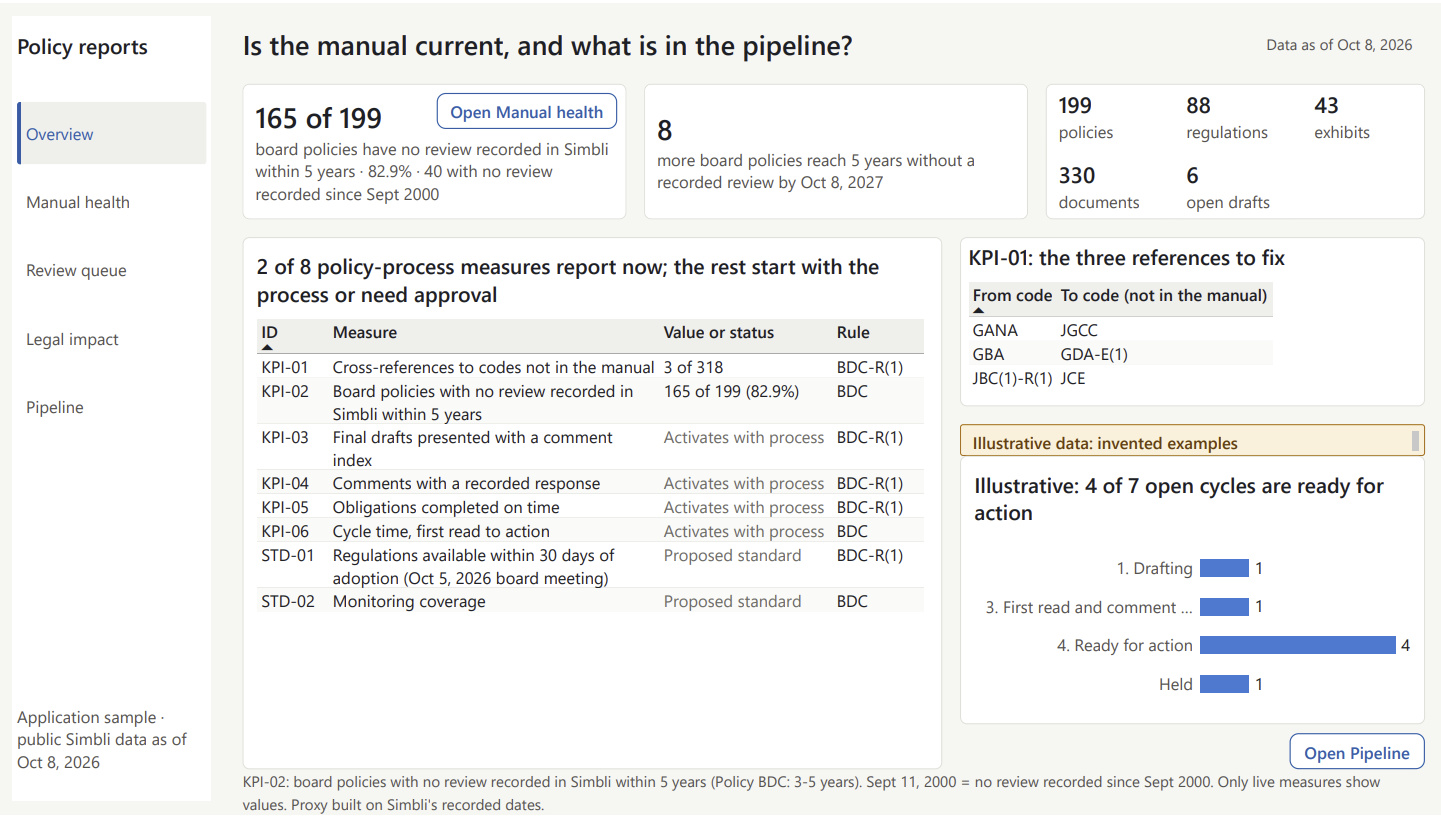
Source: DCSD’s public Simbli policy manual, as of Oct 8, 2026. Review dates are those recorded in Simbli. Views that use illustrative data to show how the process would be tracked are labeled on the page.
Tracking changes in law
This is a law-to-policy comparison. It lists what Georgia law tells a school board to put in policy, shows where DCSD’s manual cites each requirement, and flags recent changes that may need attention first.
I found 60 sections of Georgia law and State Board rules that require a local school board to adopt a policy and compared them with the legal references in DCSD’s policy manual. A current board policy cites 56 of them. One more is a State Board rule whose underlying statute is cited.
Three sections, all added to Georgia law in 2024 and 2025, may not be reflected in the manual yet. They could already be handled through procedures or the Code of Student Conduct, and for two of them the district is already acting.
| Law | What it asks for | What the manual shows (as of Oct 8, 2026) | District action on record |
|---|---|---|---|
| Student social mediaSB 351 (2024), O.C.G.A. § 20-2-324.7 | A social media policy covering student access on district devices and networks, consequences, and parent procedures | IFBG (2011) and the student social media guidelines (2016) predate the law. A revision of IFBG is under board review; its drafts so far do not add these provisions or cite the law. | IFBG revision on the board agenda since October 2025 |
| Personal devicesHB 340 (2025) and HB 1009 (2026), O.C.G.A. § 20-2-324.8 | Policies and procedures limiting student device use during the school day | JCD (2012) limits device use during “instruction time.” | Districtwide phone restrictions since August 2025; phone locker contract on the board agenda in September 2025 |
| Chronic absenteeismSB 123 (2025), O.C.G.A. § 20-2-690.3 | Policies and procedures to identify and support chronically absent students | JB (2011) covers unexcused absences and truancy. A sample redraft is below. | Board-approved attendance intervention program since October 2023, renewed in July 2026 |
I’m not a lawyer. This review relied on keyword searches of Georgia law, State Board rules, bills passed from 2023 through 2026, and the manual’s legal references, so it can miss requirements worded in unusual ways. On Oct 5, 2026, the district announced it is preparing to begin a policy review with the Georgia School Boards Association (GSBA). A full gap analysis is GSBA’s work, and Legal Affairs reviews each item. This review points to a short list worth moving up the queue: these three laws, plus five sections where the law changed after the citing policies were last revised.
Full workbook: requirements, sources and method
Start with the Read me and Validate first tabs.
Drafting policies and regulations
Policy drafting sample: Student Attendance (Policy JB)
This sample redrafts DeKalb County School District Policy JB: Student Attendance and adds a companion regulation, JB-R(1), to reflect Georgia attendance law in effect on Oct 14, 2026, including the chronic absenteeism requirements of SB 123 (2025). A cover memo maps each section of the current policy to its place in the draft and the law behind it, and lists the questions for Legal Affairs and the choices left to the district.
Read the sample draft (PDF, 11 pages)
Sample draft for discussion, written for review by the owning chief and Legal Affairs. Built from public records. Not a district document.
How I would approach a policy update
- Start with the law. Read the signed bills, the current code and the State Board rules, and note what each one requires of the board in the law’s own words.
- Take inventory. Test each sentence of the current policy against the law, and check the related documents, such as regulations and the Code of Student Conduct.
- Build a crosswalk. Give every sentence a recommendation (keep, revise, move to a regulation, add or refer to Legal Affairs) and the source behind it.
- Review with the people who decide. The owning chief sets direction. When a GSBA review covers the policy, the draft goes through GSBA’s review and legal check first, so Legal Affairs reviews one reconciled draft.
- Draft, check and track. Draft the policy and regulation with the chief. Before the draft goes forward, run a separate review of every citation, quote and placement decision against the source text. Then track the draft through first reading, public comment and adoption.
Policy process
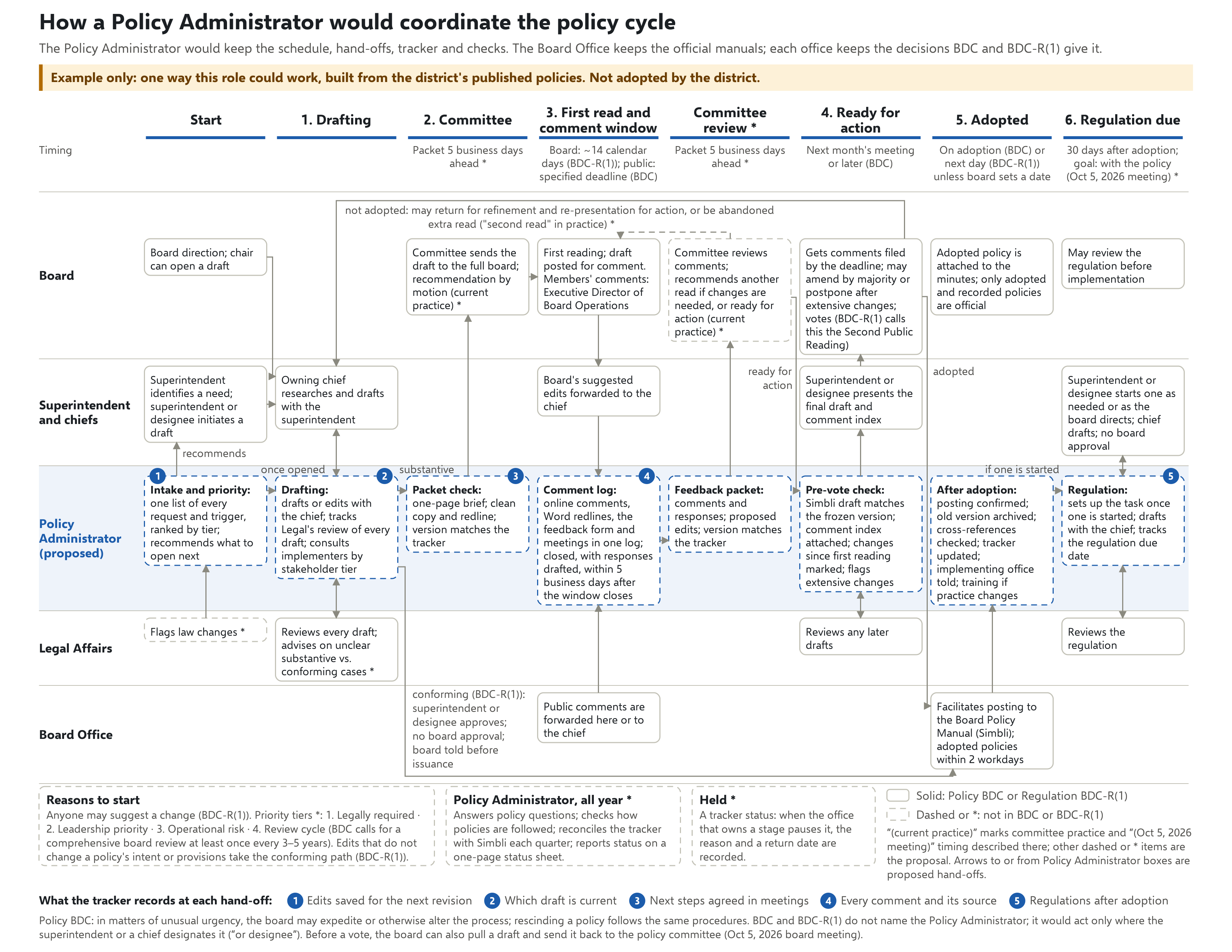
A finished policy is legally sound, strategically aligned, clearly written and backed by a plan to carry it out. The process below supports each of those with tools the district already has.
- DraftingThe owning chief researches and drafts with the superintendent, and Legal Affairs reviews and advises.
- CommitteeThe policy committee reviews the draft and sends it to the full board.
- First read and comment windowThe board holds the first reading, and the draft is posted online for comment.
- Ready for actionThe superintendent or designee presents the final draft to the board with an index of the comments received.
- AdoptedThe Board Office facilitates posting of the adopted policy in Simbli, the district’s policy platform, within two workdays.
- Regulation dueAny regulation the policy needs gets an owner and a due date: 30 days after adoption, the timing described at the Oct 5, 2026 board meeting. The stated goal is a draft regulation with the policy. Policy BDC and Regulation BDC-R(1) set no deadline for regulations.
Stages 1 through 5 follow Policy BDC and Regulation BDC-R(1). In current practice, the committee reviews the comments between the end of the comment window and the vote. Before a vote, the board can also pull a draft and send it back to the policy committee, as described at the Oct 5, 2026 board meeting.
Three rules
- Keep every draft in one place, and save each version as its own numbered file in Simbli or one shared folder.
- Freeze the draft when the packet goes out, and make redlines with Word’s Compare feature, never by hand.
- Log every comment from any channel in its own row, and record a response.
Who does what
The Policy Administrator coordinates the schedule and hand-offs, tracks each draft and checks citations. Chiefs draft with the superintendent. Legal Affairs reviews and advises on every draft. The Board Office keeps the official manuals and facilitates posting. The committee recommends, and the board votes on policies.
Stakeholder feedback and records
The tracker is one Excel workbook that keeps the 11 policies and regulations now in review in one place. Each one has a row: stage, owning office, last action, next step, next date and regulation status. A Comments tab logs every comment, the office it went to and the response, so the comment index for each final draft comes straight from the log.
The tracker produces the one-page status sheet for each committee packet. Board members keep commenting in Word on the redline, as they do now, or use a short feedback form. A planned Power Query import would pull Word comments from the redlines into the log in one step. In the district, the workbook would live in a shared SharePoint or Teams folder, where everyone works from the same copy.
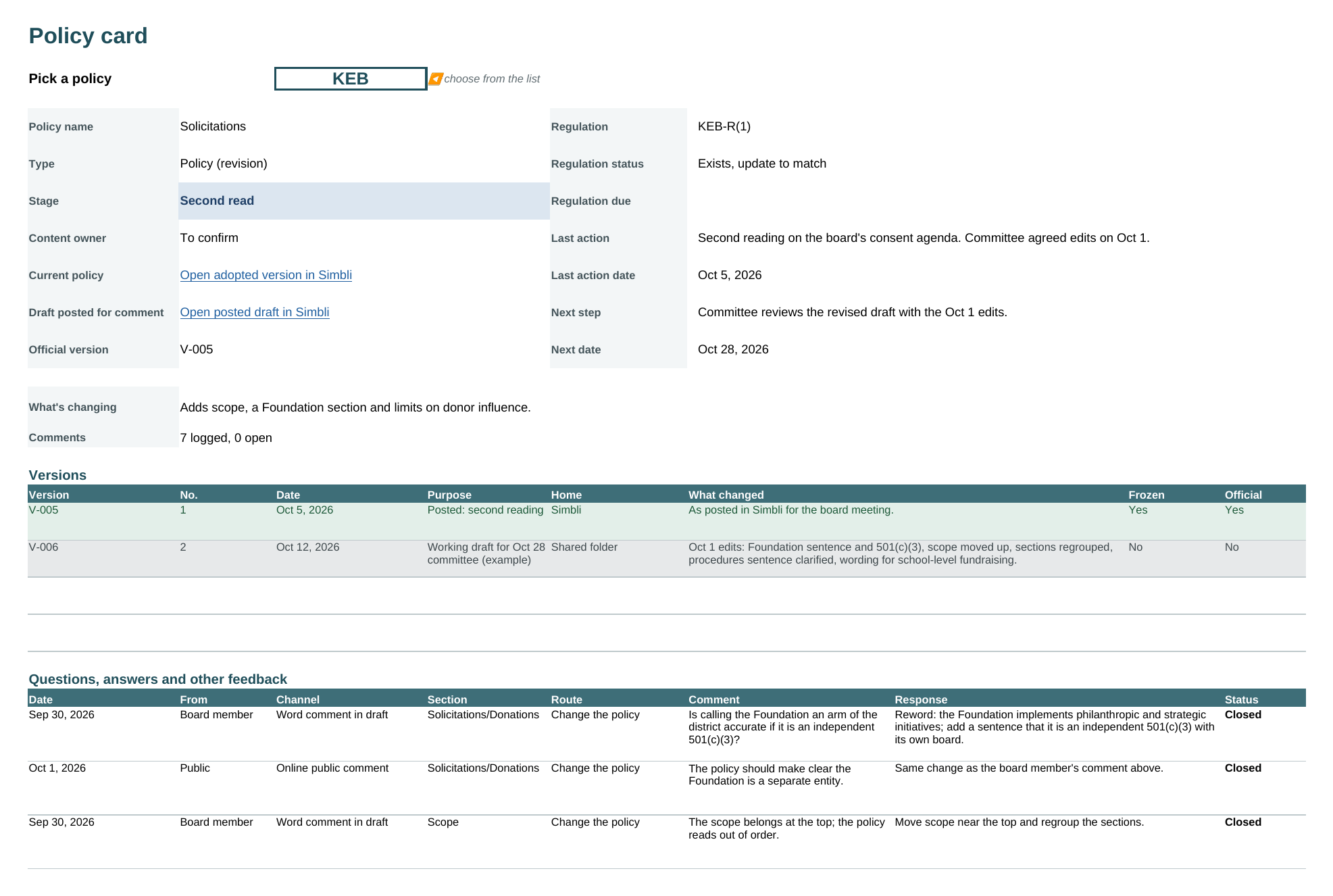
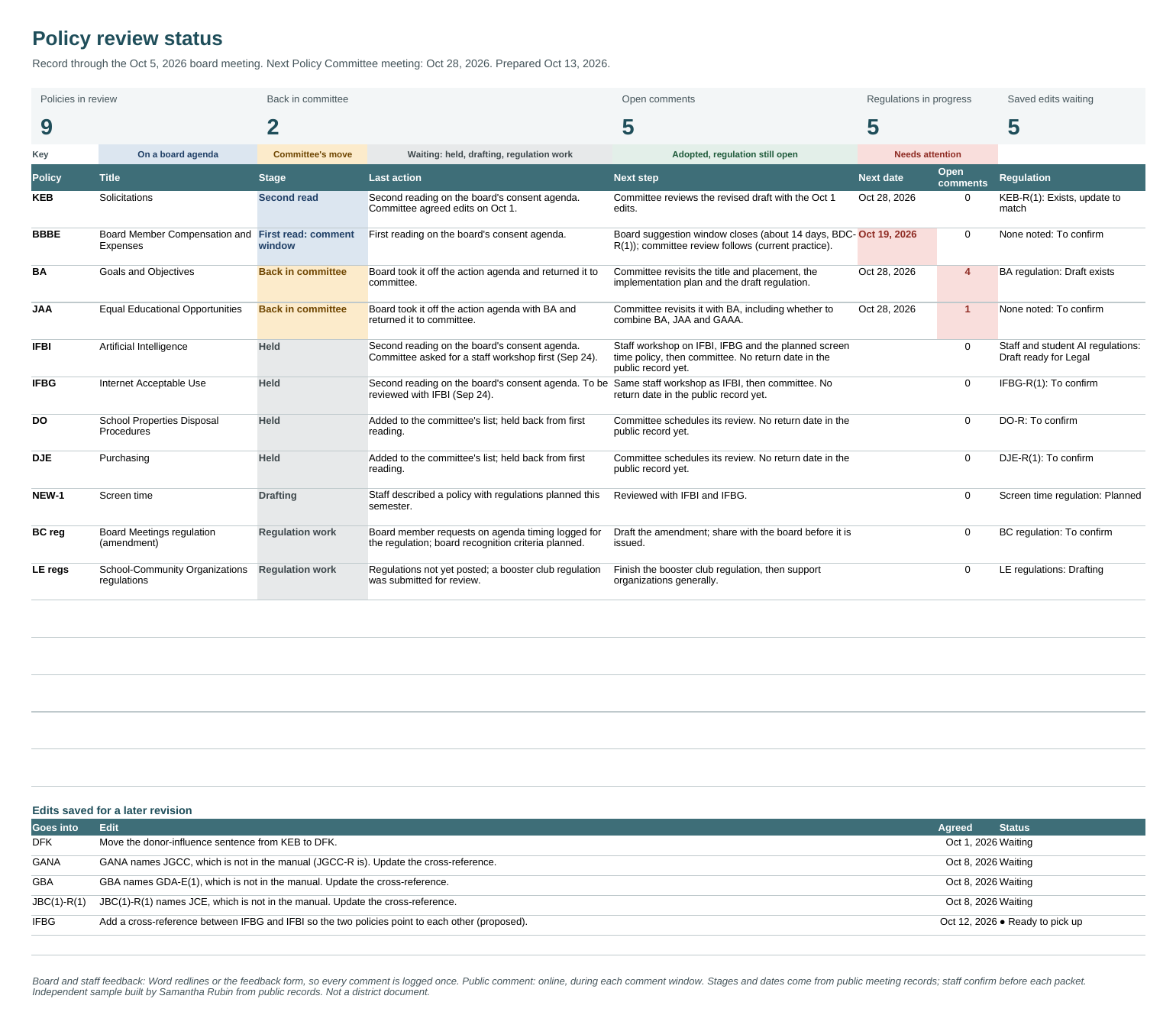
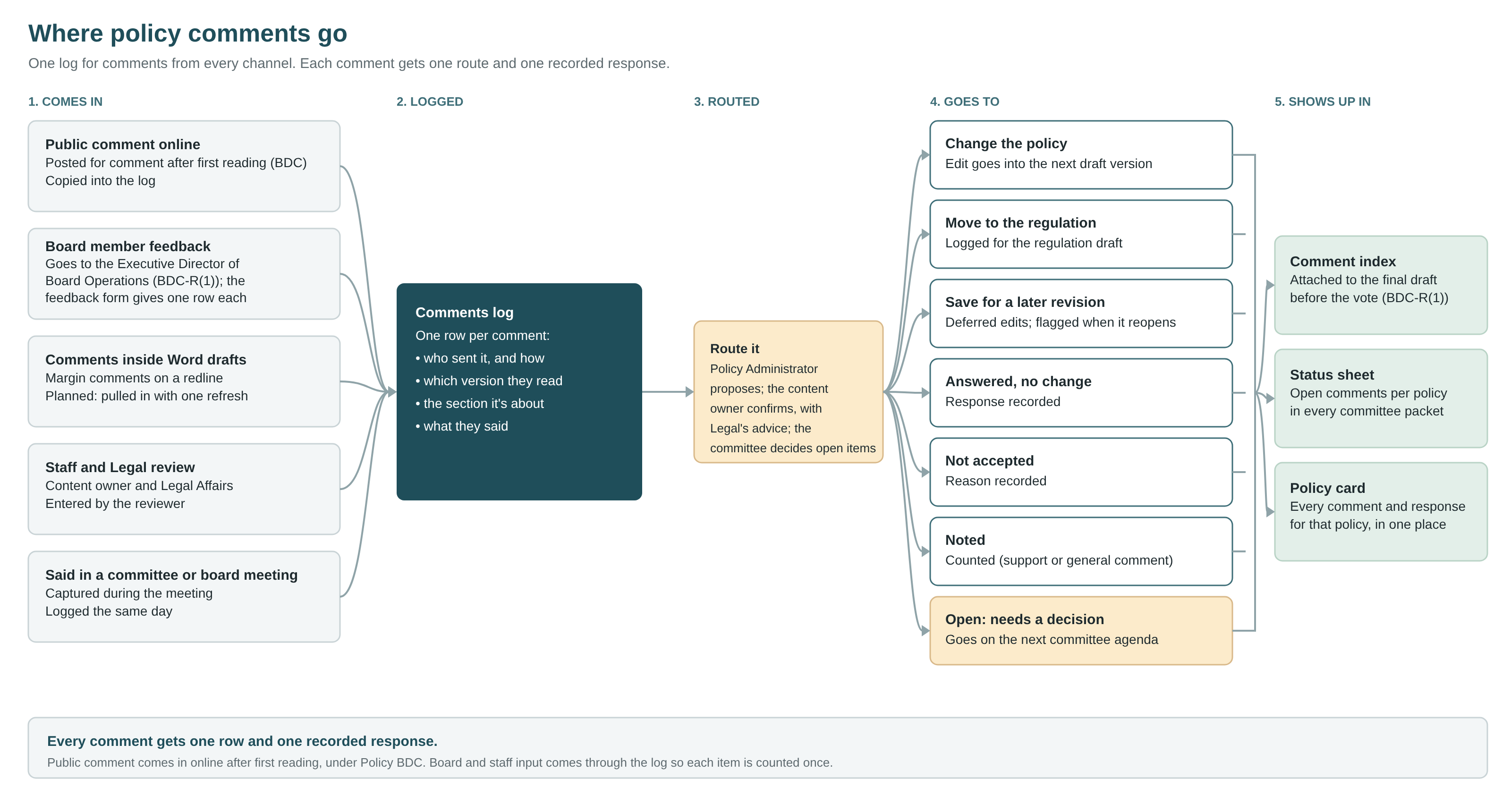
I built these in Excel and Power BI because most districts already have them. The same tracker and reports could also run in Microsoft Lists or in Simbli, depending on the features the district licenses.
Communication, implementation and compliance
After adoption, staff need to know what changed, have somewhere to ask questions and get trained when practice changes. Someone also has to check that the policy is working. At Duke Energy, I built and ran a SharePoint site with forms and workflows for questions and requests, and led training programs for multiple business groups. The Policy Center, a concept intranet site, applies that model to board policy. Each piece is designed for Microsoft tools most districts already have: SharePoint, Lists, Forms and Power BI.
- Adopted
- Change notice
- Questions and training
- Policy record
- Compliance and outcomes
- The Policy Center home page. What changed this month, what’s open for public comment, upcoming board dates and an “Ask a policy question” button. Each person sees the items for their role.
- Change notices. A plain-language summary of what changed, who it affects, when it takes effect and whether training is needed, in the same format every time.
- The policy question form. Every question is logged, routed to the office that owns the policy and answered. Answers to common questions become FAQ entries, and questions that cluster on one policy show where it needs clearer writing or training.
- The board feedback form. Board members and staff use it for anything not written in a redline: a question, a request or a general comment. Each response becomes one row in the tracker’s comment log, with nothing retyped.
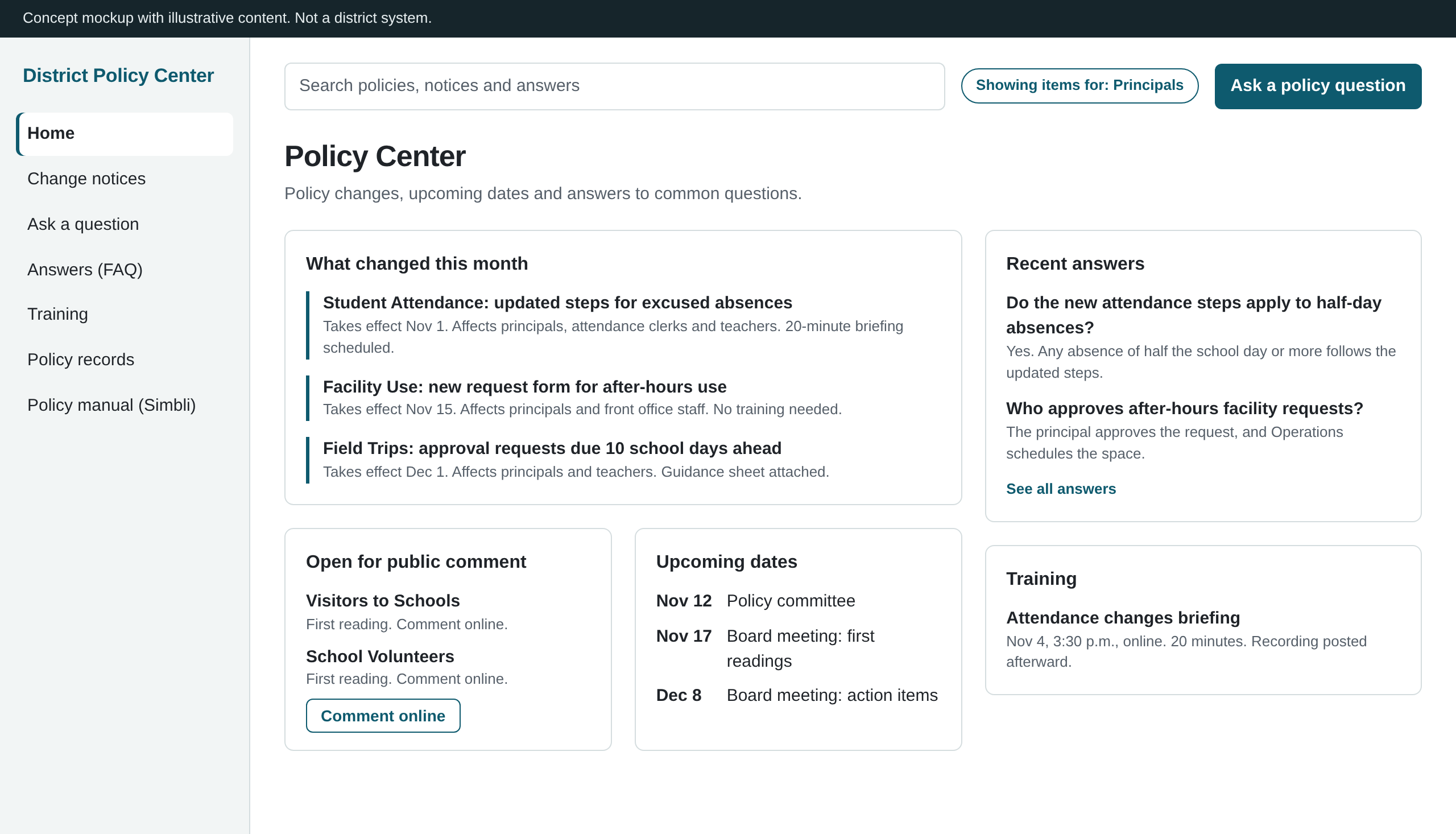
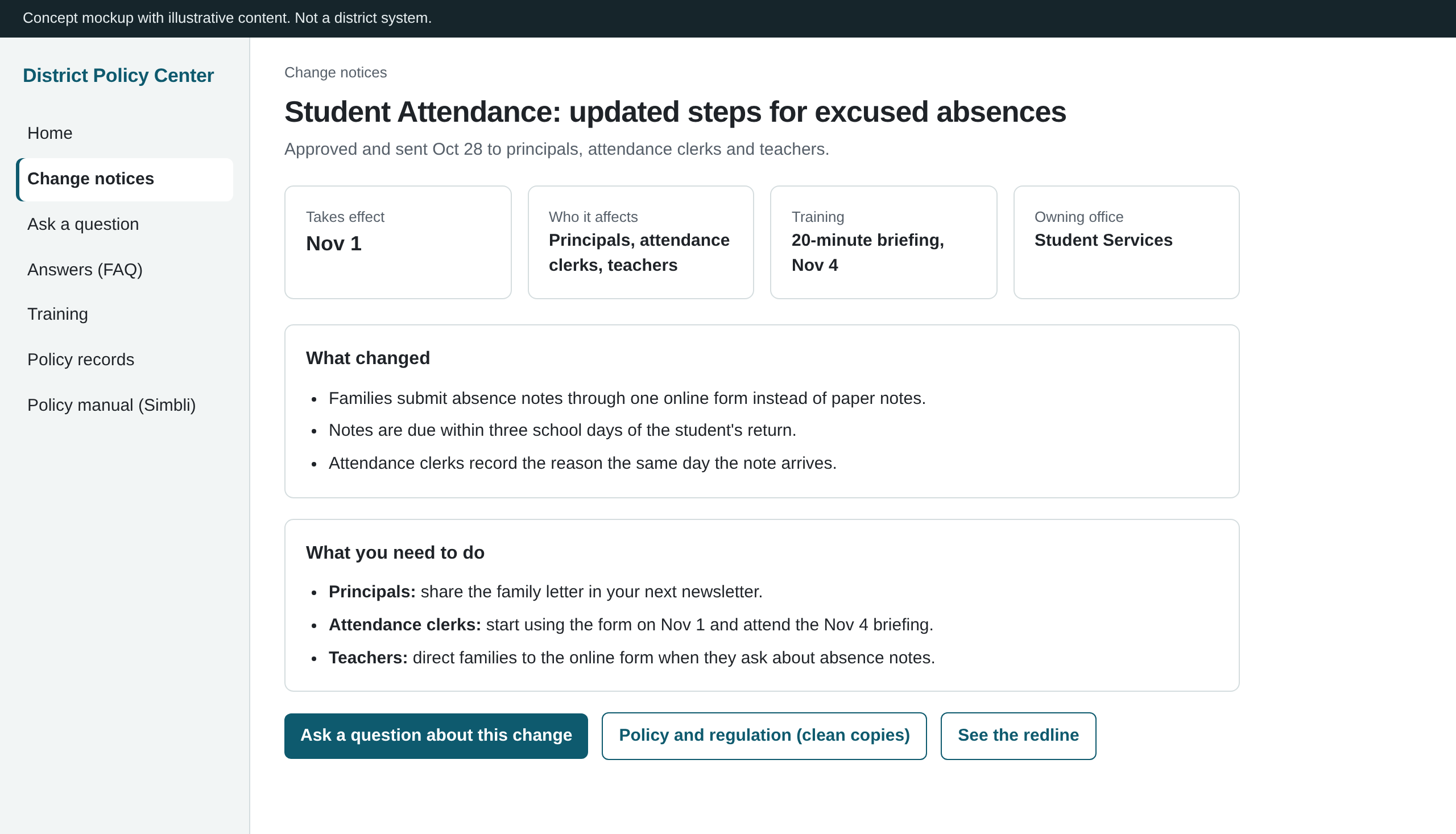
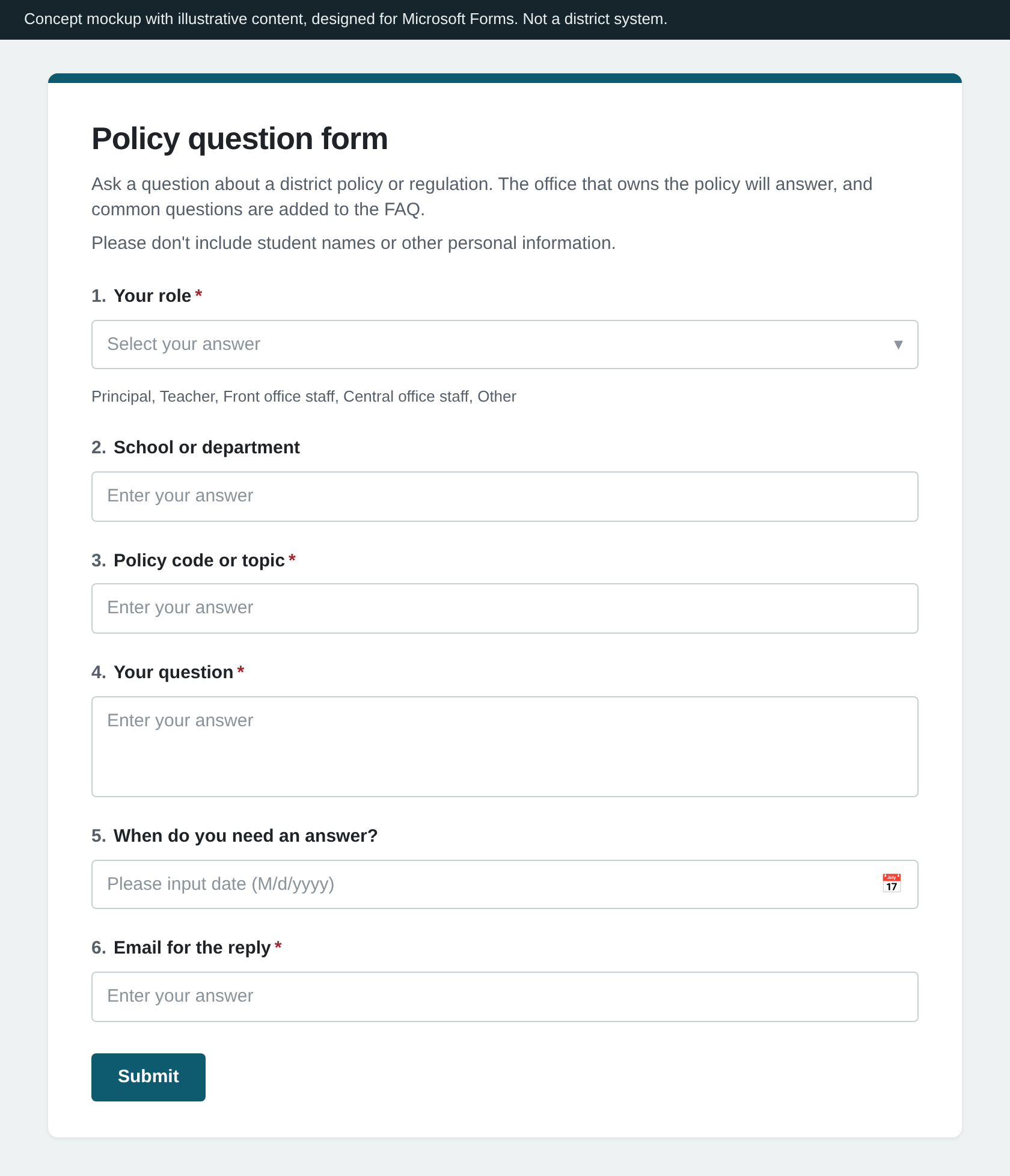
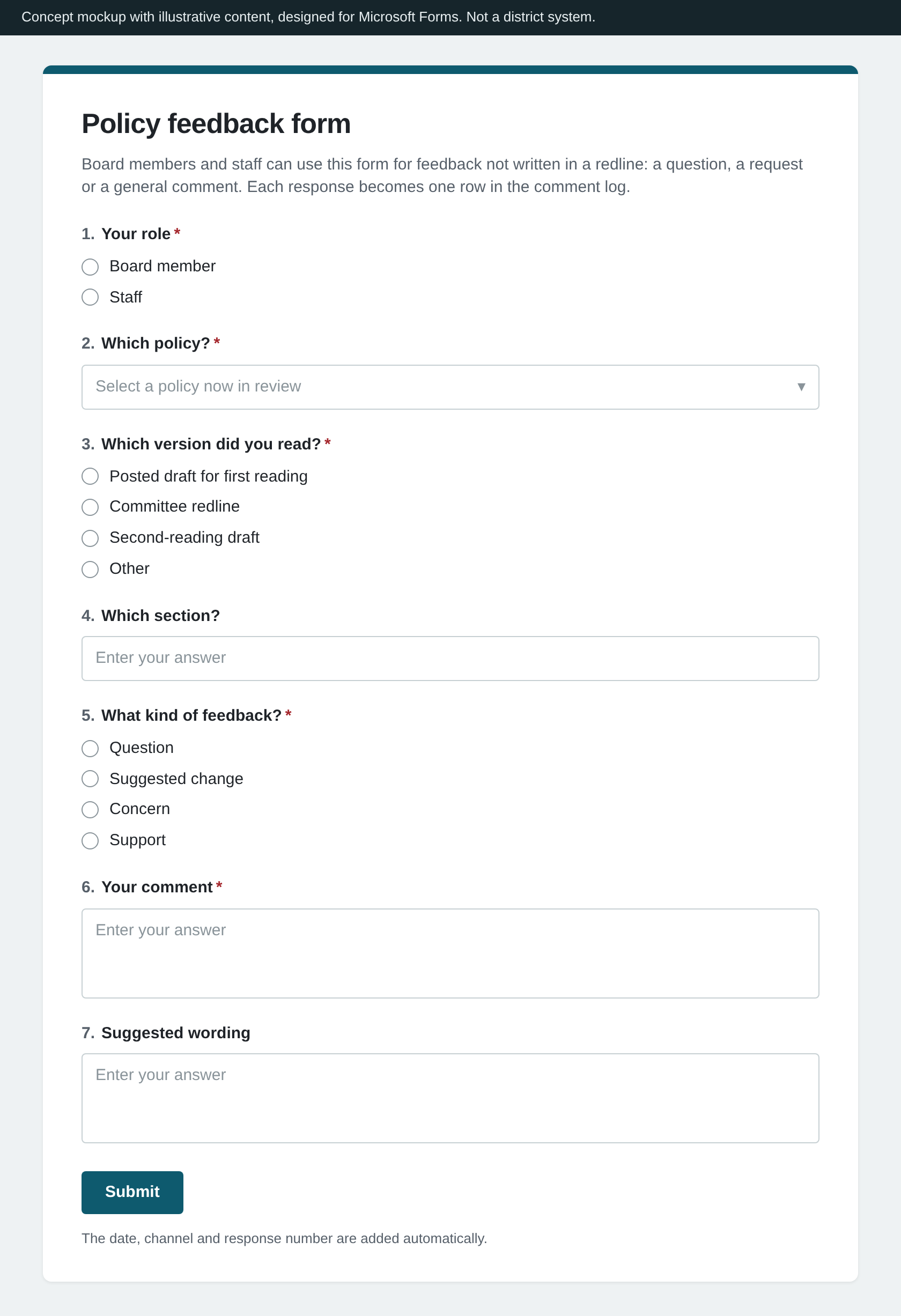
Concept mockups with illustrative content, designed to be built in SharePoint, Microsoft Lists and Microsoft Forms. Not a district system.
Tracking rollout and compliance
Each adopted policy gets one record: a rollout and compliance checklist that links its regulation and exhibits and lists what the policy requires. It answers three questions in order.
- RolloutDid we put it in place?The change notice, training and updated documents, each with an owner and a due date.
- ComplianceIs it being followed?The record names how compliance with each requirement is checked. A check that needs follow-up opens a corrective action with an owner and a due date.
- OutcomesIs it achieving its goal?For policies that set measurable goals, a monitoring report shows progress against them, like the sample for the draft goals policy below.
The record also lists every report and notice a policy requires, with an owner and the next due date. Together, those dates make one calendar of what each office owes and when.
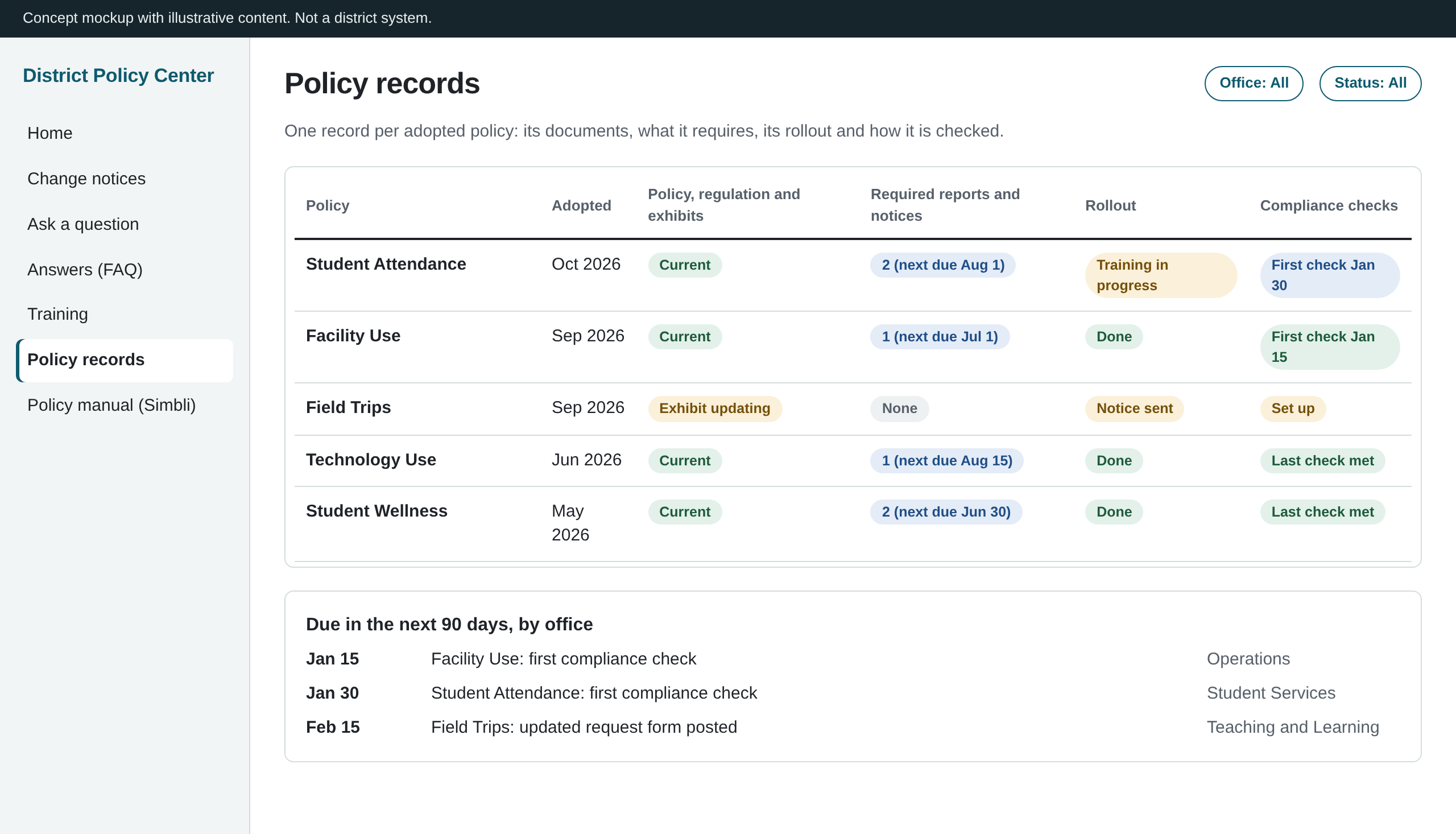
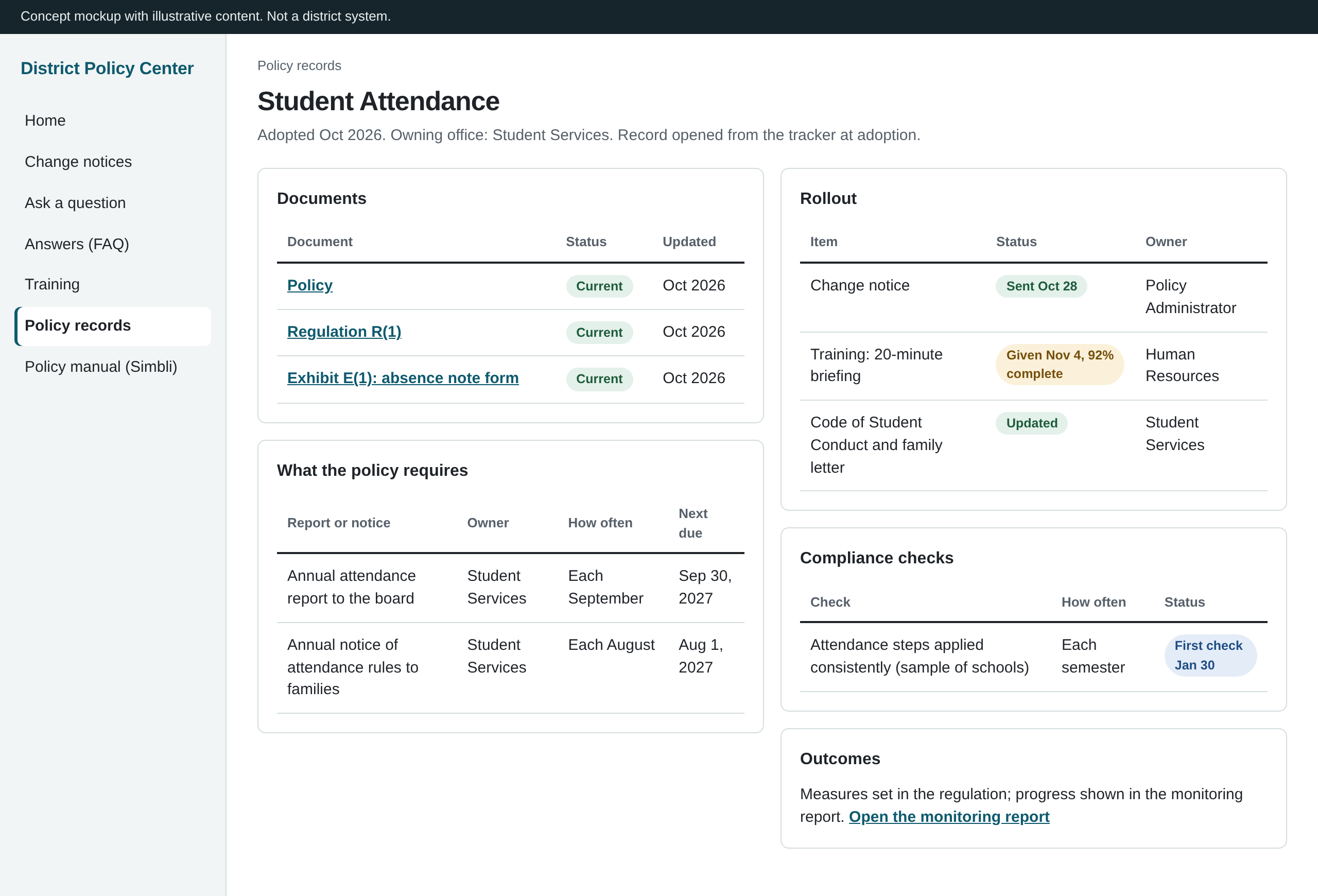
Concept mockups with illustrative content, designed for Microsoft Lists. Not a district system.
Compliance reporting for the draft goals policy
Monitoring report sample: draft Board Policy BA
This is a working sample of how monitoring under DeKalb County School District’s draft Board Policy BA (Goals and Objectives, 2nd Reading) could be reported to the board and the public. The policy is still under committee review, so its areas and wording may change. This is an independent sample, not a district report.
It uses public data only: Georgia Department of Education and Governor’s Office of Student Achievement files, and the district’s 2025 facilities report. Every figure was traced to its published source and checked against it. The sample is directionally accurate rather than exact: the state leaves out small student groups, unrated schools are not shown, and data years differ by source, so figures will not match district records exactly.
A production version would use the district’s own records and go through a more thorough validation process before use. It would also add drill-throughs to individual schools, grade levels and student groups over time, and filters that apply across the whole page.
Live Power BI report: draft Policy BA monitoring sample
Interactive. The overview shows each area the draft policy names. Hover over the ⓘ on a tile for its definition and source, and open a tile for that area’s details.
The live report is designed for a computer screen. On a phone, the PDF copy is easier to read.
The first 90 days
A starting plan. Some of it will change as I learn, and the Chief of Staff sets the priorities.
Meet the offices and set up the tracker
- Meet with the Chief of Staff to confirm priorities, including the policy review with GSBA and how this role supports it.
- Meet with each office in the policy process: the Board Office, Legal Affairs and the policy contact in each chief’s division.
- Review the drafts in the tracker with each office and check them against Simbli, so each draft’s status is confirmed within the first two weeks.
- Share the law comparison’s short list (three laws and five changed sections) with Legal Affairs and the owning chiefs, so they can decide what moves up the queue.
- Set up the shared folder and the version-numbering rule for the drafts now in review.
- Confirm which Simbli features the district licenses, and how Microsoft 365 groups and sharing are set up.
- Ask IT who can use Microsoft Forms and SharePoint, including whether board members have access.
By day 30: every draft in progress tracked with an owner and next date, and a one-page map of how policy moves today, reviewed with the Chief of Staff.
Put the tracker and forms to work
- Prepare the next committee packet from the tracker, with a status sheet and comment index.
- Launch the policy question form and log, and pilot the board feedback form for one committee cycle.
- Test a Power Query import that pulls board members’ Word comments from the redlines into the comment log.
- Finish checking the full manual inventory against Simbli, and confirm with the Board Office the review dates the policy report uses.
- If GSBA’s review is under way, use the law comparison to check its recommendations against district policy and practice.
- Offer the attendance crosswalk to the owning chief as a starting point for Policy JB, or as a check on GSBA’s version.
By day 60: the next committee packet goes out from the tracker, and the question log is live.
Policy-or-regulation test and review calendar
- Propose a written test for what belongs in policy versus regulation, for leadership and the board to decide.
- Build a prioritized review calendar: legal changes first, then leadership priorities, then operational risks, then everything else, oldest first.
- Set up the rollout and compliance checklist in Microsoft Lists, using the access IT confirmed in the first 30 days, then send the first change notices and set up the first compliance checks for newly adopted policies.
- Hold the first training session on a recent policy change.
- If the board adopts Policy BA, agree with the owning office on the data and schedule for its annual report, using the monitoring sample as a starting point.
- Look into connecting the tracker to Power BI, so the report’s Pipeline page shows real data, and into Power Automate alerts when a new redline is filed.
By day 90: a review calendar approved by leadership, the first change notices sent and a status report to the Chief of Staff.
How my experience maps to this role
I spent more than ten years at Duke Energy, a regulated utility with more than 27,000 employees, building governance and reporting systems, and I want to use that experience in public education. Since March 2026, I’ve researched Georgia school district policy, funding and data, including how districts make, track and report on board decisions. My goal is to help a district connect what the board decides with what happens in schools, with a named owner for each policy and data that shows the results.
Duke Energy customers reach the company through an automated phone menu, the website or the call center. To measure how well each channel served customers, such as how many people who started an outage report online finished it, every team had to use the same definitions. I owned those definitions and the rules for applying them. I wrote them, confirmed them with the teams that ran each channel, tracked results against them and brought recommendations to the team that could act.
A district’s policy manual exists to keep the district’s policies legal, consistent, accountable and transparent. My work at Duke Energy and Gallup served those same purposes. At Duke Energy, governance kept definitions consistent across every team, gave each owner visibility into their own results and kept one documented record anyone could check. At Gallup, I drafted client proposals from conversations with prospective clients and coordinated legal review of the proposal language before submission. Policy uses the same division of labor: Legal Affairs reviews and advises, and my part is making sure every draft gets that review, its legal references stay current and changes in law reach the policies they affect.
| The task | What I did before | The same task in this role |
|---|---|---|
| Write the rules | Wrote the definitions and rules teams across the company used, such as what counted as a completed outage report | Draft and update policies with the owning chief so they are legally sound, strategically aligned, clearly written and actionable |
| Get agreement from the people affected | Met with each team to confirm the definitions before they were used | Work with chiefs, Legal Affairs and the Board Office on each draft |
| Get legal review | At Gallup, coordinated legal review of proposal language before submission | Send every draft to Legal Affairs for review and keep legal references current |
| Keep one record | Kept every definition and change in one place | Keep organized records of every policy, draft and change |
| Check practice | Audited what the phone menus, website and call center did against the written rules | Review the manual and check whether practice follows policy |
| Recommend changes to the owner | Sent recommendations to the team responsible and worked with it on corrective actions | Recommend changes and work with departments on corrective actions |
| Look into problems | Investigated customer complaints filed with state utility commissions, tracing each customer’s path to find where service broke down | Look into policy issues as they come up and report them to the owning office |
| Show each owner their results | Built accountability dashboards so each process owner could see its own results against the standards | Report status to leadership and the board |
| Help people use the rules | Built a SharePoint hub with forms for questions and requests, and led training programs for multiple business groups | Route policy questions to the owning office, send change notices and train staff |